


Our specialists from the keyboard department look forward to your call.

More Control + More Creativity = More LX+!
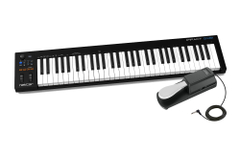
The USB MIDI controller keyboard Impact LX61+ is packed with intelligent and expressive control options that few premium products offer. Have you always wanted a keyboard controller that automatically connects to your DAW? The Impact LX+ delivers exactly that.
Nektar’s DAW integration, specially developed for Bitwig, Cubase, Digital Performer, FL Studio, GarageBand, Logic, Nuendo, Reaper, Reason, Sonar, and Studio One, goes far beyond the features a USB MIDI controller keyboard usually offers. With the Impact LX61+, the hard work is done for you so you can focus on your creativity.
The Impact MIDI Controller with 61 Keys
The 61-note velocity-sensitive keyboard features synth-action with medium tension. The full-size piano-style keys are covered to protect against dirt and dust while complementing the Impact LX61+ design. With 4 velocity curves that increase dynamics stepwise, there’s a choice for every playing style. If you don’t need velocity sensitivity, 3 fixed velocity levels provide a consistent output. Octave and transpose keys as well as pitch bend and modulation wheels are within reach, allowing you to quickly shift the keyboard up or down or apply additional articulations with the wheels as needed.
Octave & Transpose Keys
The 4 octave and transpose keys offer more than meets the eye. Four functions are directly selectable, so you can make important changes anytime, even while playing. A key combination makes assignment quick and easy.
Options include sending MIDI program messages, changing the global MIDI channel, or selecting one of the 5 user presets of the Impact LX61+ with the octave or transpose keys.
The Control Hub in the Center of the Panel
9 x 30-mm faders, 9 x MIDI buttons, and 8 x encoders are at the heart of the Impact LX61+ control panel. Each control is fully programmable to send any MIDI CC commands for use with hardware or software MIDI products. Combined with Nektar’s DAW integration, the controls come alive and offer flexible, pre-programmed DAW control that gives you the best of both worlds. Control settings can be saved in one of 5 Impact LX61+ presets and recalled anytime. And when you activate the zero function, all parameter values are saved when switching presets, avoiding parameter jumps.
Freely Assignable LED Buttons Combined with Perfect MIDI Integration
The 8 velocity-sensitive pads of the Impact LX61+ make life easy when creating grooves and beats. The pads are calibrated to trigger with a light touch, making finger drumming with a nice and even velocity suddenly within reach. Each pad can be assigned any MIDI note number or MIDI CC command to use it as a MIDI trigger or toggle button. But the best is the "Pad Learn" function, where you simply select a pad, play the desired note or drum sound on the keyboard, and the assignment is done. No complex menus for a task essential to optimal pad use. Assignments are saved when the system is powered off, so you don’t lose your settings when turning off your system overnight. Additionally, you can save your settings to 4 pad map memory slots for later recall.
The 4-color LED lighting not only looks good but also indicates which pad map is currently loaded and can even tell you what type of MIDI command each pad sends. With Nektar DAW integration, pads are automatically mapped in, for example, Reason and Bitwig. The two clips and scenes buttons are used in Bitwig to trigger clips and scenes. In Reason, clever control of Reason’s position points creates a similar experience triggering scenes in any Reason song.
Nektar DAW Software Integration
The Impact LX61+ software integration supports most common DAWs. A shared workflow provides access to many functions you’ll most likely need when recording and performing with your Impact LX61+. The best part is everything is done for you: just complete the installation process and start making music! The Impact LX61+ DAW integration currently supports Cubase, Digital Performer, FL Studio, GarageBand, Logic, Nuendo, Reaper, Reason, Sonar, and Studio One. The buttons and controls are labeled so you don’t have to remember their assignments. That’s why the Impact LX61+ is easy to use but with enough extra features under the hood to challenge even the most experienced power user.
Transport Buttons Make Navigation Easy
The 6 dedicated transport buttons are always within reach and control cycle, rewind, forward, stop, play, and record. Simply press the shift key to access alternative functions like go to L, set L, set R, undo, click, and mode. Dedicated track up/down and patch up/down buttons are located below the display.
Ultimate Mixer Control
Press "Mixer" and the first 8 faders of the Impact LX61+ are assigned to control 8 channels of your DAW mixer. The "Bank up/down" function lets you switch the assignment to the next or previous group of 8 channels. The 9th fader is assigned to the currently selected channel so you always know where to find it.
The buttons below the faders follow the channel assignment of the corresponding fader and can control mute or solo. The pan for the group of 8 channels controlled by the faders is handled by the 8 knobs. Fader 9 controls the volume of the current mixer channel as well as the master volume.
To help you make the most of your screen, the Impact LX61+ also features shortcuts to open and close the DAW mixer window so you always keep an overview.
Custom Instrument Presets for Playful Pre-Setting
The instrument button assigns all controls to instrument parameters as soon as an instrument track is selected in your DAW. Nektar mapping ensures this happens automatically so you can start fine-tuning immediately. Even better: many devices and plug-ins are already mapped to match the blue controls of the Impact LX61+.
The Page Button
With Nektar DAW integration, you can switch between default and user settings via the page button, with LEDs clearly indicating which side is active. Each side changes the assignment of the 8 pots, with the user side available for custom assignments. Many pre-made plugins take advantage of both sides*. For example, you can instantly access parameters of oscillator 1 and oscillator 2 via the pots and switch between oscillators with the page button.
Additionally, in a typical control layout, the ADSR envelopes of amplifier and filter are placed on the faders for immediate access, regardless of whether the default or user side is selected.
Grab and Nektar Maps
The Nektar "Grab" mode lets you temporarily assign parameters to controls while working on your project. Simply hold the shift key and move the parameter of the instrument you want to control, then move the Impact LX61+ controls you want to assign. Some DAWs even support saving "grabbed" parameters in a Nektar map, meaning you can fully customize your assignments for future use. Implementation depends on the DAW.
User Presets and MIDI Programming
If you mainly want to use your DAW’s MIDI learn functions, the Impact LX61+ is easy to handle. There are 2 non-overlapping, write-protected presets on the mixer and instrument buttons so you can quickly switch between independent and unique setups. These presets are also used for the integrated DAW support of the Impact LX61+. Additionally, 5 user presets are programmed for GM-compatible and learn-friendly setups, which can of course be overwritten with your own settings. This lets you set up the Impact LX61+ for use with Pro Tools or Ableton Live, both of which have limited integration options. With the generic MIDI controller capabilities of the Impact LX61+, you can get pretty far. When the zero function of the Impact LX61+ is activated, parameter values are saved when switching presets, avoiding parameter jumps.
Connectivity with Apple & iOS
On the back of the Impact LX61+ you’ll find connections for:
- USB port for power and data connection to your computer or iPad (via optional USB camera connection kit)
- Assignable footswitch jack (pedal not included)
- On/off switch
As a bus-powered USB device, the Impact LX61+ works with all USB devices that have a class-compliant MIDI driver. This includes all Windows versions from XP and up, Apple OS X 10.5 and higher, and Linux (if a USB MIDI driver package is installed). And if you’re often on the go, you can easily connect your Impact LX61+ keyboard to an Apple iPad using the optional iPad USB camera connection kit (optional). Of course, the Impact LX is powered via the iPad, so you can work as long as your iPad is charged.
BITWIG 8-TRACK Software Included
Bitwig 8-Track comes with every Impact LX+, so you can produce, perform, and design sounds like a pro from day one. With Bitwig 8-Track, you get access to over 50 software instruments and effects that you can use on up to 8 audio or MIDI project tracks, and you can also use all third-party VST plug-ins. The Bitwig Essentials Package, an extremely versatile, handpicked selection of loops, clips, and samples, is also included to help you get started. All this combined makes a powerful sketchpad for your musical ideas, offering the proven workflow of Bitwig Studio.
Nektar DAW integration supports Bitwig 8-Track, making the combination of Nektar Impact LX+ and Bitwig 8-Track fantastic. If you’re just starting out, you’ll find this the perfect way to take your first steps into digital music production. And if you’re already familiar with computer software, you’ll be amazed at what this combination offers!
Sustain Pedal
This pedal fits any electronic keyboard instrument with a 6.35 mm jack socket. The polarity switch allows you to adapt the pedal to your instrument if needed. The cable has an angled plug to prevent cable breakage if the piano is placed directly against a wall. Non-slip rubber feet on the bottom ensure a firm grip even on smooth floors.
Features
Keyboard
- 61 velocity-sensitive synth-action keys
- 4 velocity curves & 3 fixed curves
- Pitch bend & modulation wheels
- Octave shift keys
- Transpose shift keys
- LED display
- Dimensions (W x H x D): 788 x 254 x 76 mm
- Weight: 3200 g
Controls
- 8 potentiometers
- 9 30-mm faders
- 9 assignable buttons
- 6 dedicated transport buttons
- 5 preset slots for saving control settings
- Page button (only for Nektar DAW integration)
- Nektar DAW integration for major DAWs
Pads
- 8 velocity-sensitive pads
- Each pad LED lights with 4 color options: green, yellow, orange, and red
- 4 velocity curves plus 3 fixed
- Note learn function
- Pads assignable to notes and MIDI CC commands
- Load or save one of 4 pad maps
- Clips and scenes LED buttons
Connections
- 6.3 mm TS jack footswitch input (MIDI assignable)
- USB port on the back and bus-powered via USB
- Connection to iPad via Apple Camera Connection Kit (not included)
System Requirements
- USB class compliant, no driver required for:
- Apple iOS, Apple OSX, Windows XP or higher, Linux (MIDI driver software required)
Nektar DAW Integration
- Mac OS X 10.7 or higher, Windows Vista, 7 & 8 or higher
- Deep DAW integration including track volume/select, panning, patch selection, and more
- Adaptations for all common DAWs (Logic Pro X, Cubase, Studio One, Reason, Bitwig Studio, GarageBand, Reaper, Sonar, FL Studio, and Digital Performer)
Sustain Pedal
- Universal sustain pedal
- Switchable polarity
- Includes 1.6 m cable
- 6.35 mm angled jack plug
- Non-slip rubber feet
- Chrome metal button
- For all keyboards, stage pianos, and electric pianos
- Dimensions (W x H x D): 76 x 63 x 232 mm
- Weight: 370 g
- Color: black
Scope of delivery
- 1 x Nektar Impact LX61+ Keyboard
- 1 x Classic Cantabile FP-1 Sustain Pedal
Specification
- Product number 00081833
- Number of Keys 61
- Colour Black
Reviews
| 5 Stars |
|
1 |
| 4 Stars |
|
0 |
| 3 Stars |
|
0 |
| 2 Stars |
|
0 |
| 1 Star |
|
0 |
A verification of the ratings has taken place as follows: Only customers who are registered in our online store and have actually purchased the product from us can submit a rating for the item in the customer account.
Questions about product
No questions have yet been asked about this article.
Financing with ConsorsFinanz
You can finance your order in convenient monthly installments from a value of €100.00.
- 6 to 72 months term
- 0% financing for 14,08 € per month