

This item is a returned item - Condition: Good - with warranty.
Note About Condition:
Display unit with minor signs of use.

Please Note: Since the item is already stored ready for shipping in our logistics center, unfortunately no further details about the condition or additional photos can be provided.
Below you will find the description of the item as new:
Design Meets Intuition!
Intuitive User Interface Optimized for Touchpanel Operation
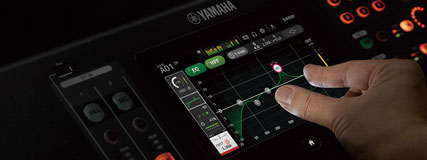
When Yamaha's engineers developed the TF series they began with the already highly optimized user interfaces of established professional desks and concentrated specifically on touchpanel operation, which has proven itself in countless real-world scenarios. Since most tasks can be executed exclusively via the touchpanel, the interface will quickly become second nature to most users. It doesn't matter whether you've used Yamaha digital consoles before, come from other digital or analog desks, or are brand new: the TF consoles guide you quickly and effortlessly to the desired result thanks to a smooth, efficient workflow. And because the screen is also surrounded by physical, real controls, operation becomes even more precise and easier.
Touch Control for Familiar Console Operation

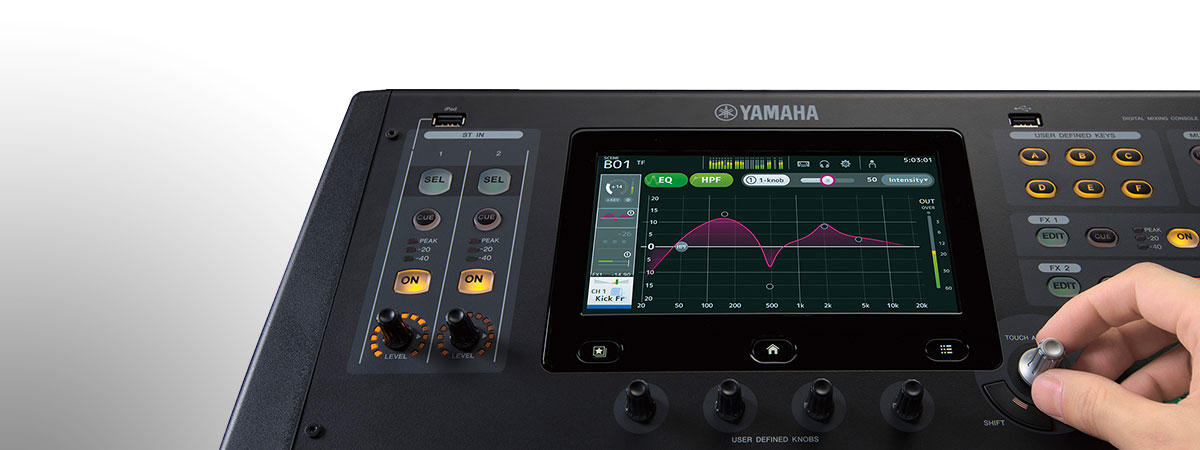
The TF user interface is perfectly optimized for precise touchpanel control and delivers such a smooth workflow that any mix in any environment can only benefit. Screen content is designed for direct, targeted access, and the element layout supports mixing in an almost instinctive way. With the touchpanel it feels as if you shape your desired sound simply with your fingertips.
Instant Control With "Touch & Turn" Knobs
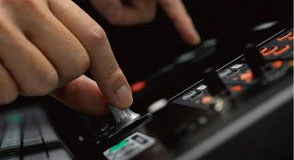 If you want to fine-tune an EQ parameter, the physical "Touch & Turn" knob is ideal and is always immediately reachable next to the touchpanel. There are also four user-defined knobs that can be assigned to additional parameters you need fast access to, such as compressor threshold or EQ gain. The knobs always affect the currently selected channel.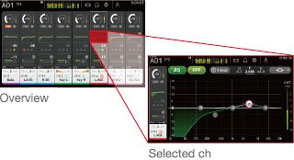
Proven "Overview" and "Selected Channel" Views
As with Yamaha's CL series, the "Overview" and "Selected Channel" views are the foundations of operation. The "Overview" display shows parameters for eight channels at once, while the "Touch & Turn" knob gives direct access to parameters like Gain, 1-Knob EQ, 1-Knob COMP, Gate Threshold, Effect Send Level, Pan and other common mixer controls. If you tap a highlighted parameter a second time, you enter the "Selected Channel" view for detailed access to the channel's parameters.
New Features for Effortless, Accelerated Setup
 Correctly setting levels, EQs and compressors requires experience and deep knowledge. Even seasoned engineers need time for basic adjustments. Beyond the intuitive interface, the TF consoles include numerous features that simplify and speed up the setup of these essential parameters.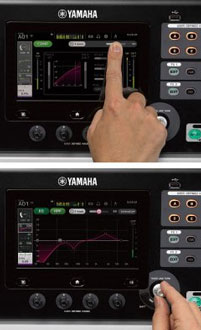
Instantly to the Ideal Sound: "1-Knob COMP" & "1-Knob EQ"
An experienced engineer can do a lot with a compressor: give a guitar fresh life, add punch to a bass, tighten a snare or bring vocals forward. With the "1-Knob COMP" all this happens quickly and effortlessly without juggling multiple confusing parameters until the desired sound appears. The "1-Knob COMP" was first introduced on Yamaha's analog mixers and proved extremely useful and popular. In the digital version the compressor has been further refined so TF consoles can be set up quickly and time-efficiently. The same concept was applied to the "1-Knob EQ": it enables simple adjustment with a single control. The "1-Knob EQ" was tuned by Yamaha's development experts together with selected mixing engineers so you can achieve great results with minimal effort. The "Vocal" mode helps achieve a clear, defined vocal sound, while the "Intensity" mode boosts or attenuates EQ curves that you select from presets or create yourself. But that's not all: the "1-Knob EQ" and "1-Knob COMP" are also available on output channels, so you can easily adapt the mix to audience size and room acoustics. The output "1-Knob EQ" features a Loudness mode instead of a Vocal mode: turning the knob to the right increases perceived level while the sound remains optimal. From both the "1-Knob COMP" and "1-Knob EQ" you can immediately access full compressor and EQ views to fine-tune settings when needed.
Reliable Leveling With "GainFinder"
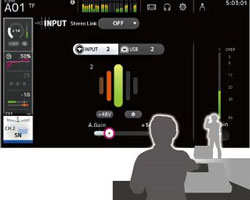 The input signal first passes the Gain stage, where the input sensitivity of the preamp is set. If the preamp is set incorrectly you not only degrade sound quality, but downstream parameters behave differently. Yamaha has found a way to make this crucial basic parameter easier than ever to set. With the new GainFinder function you can perfectly set levels so optimal signal quality is always achieved. The user simply adjusts channel gain until the green light in the middle of the meter stays on for as long as possible. Of course the meters also work as usual if you prefer to set preamps the traditional way.
Practical Presets and Scenes for a Perfect Starting Point to Great Sound
Yamaha's proven scene database, which lets you save and recall complete mixer setups, is included in the TF series. In cooperation with leading microphone manufacturers and renowned engineers many channel presets were created so you always start from an ideal position on the way to the perfect sound. Channel presets include parameters for the HA, EQ and Dynamics modules as well as details like channel naming and colors. That saves precious time on basic settings so you can focus on fine-tuning the mix and communicating with the artists.
Pro Sound: The QuickPro Presets
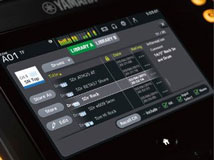 Following intensive collaboration with top engineers and microphone makers such as Audio-Technica, Sennheiser and Shure, and after long tests with numerous microphones, instruments, speakers and in-ear systems, Yamaha's team developed practical starting points recommended for many event types. Equipped with these presets, even novices can get close to the ideal sound, while experienced engineers will appreciate not having to tweak much and can use that saved time for other tasks. The QuickPro Presets are sorted by instrument type and can be recalled instantly. Presets include parameters for HA, EQ and COMP modules as well as channel naming and color. The "1-Knob" processors EQ and COMP are included in the QuickPro Presets for even faster, easier sound setup. The output channel library contains parameter sets optimized for Yamaha active speakers with variations for different environments and room sizes. Presets for in-ear monitors are also included. All these settings can be used immediately when time is short or serve as excellent starting points for your own fine-tuning. All personal settings can of course be saved to the available memory locations.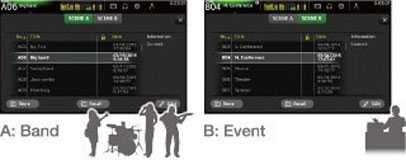
Two Banks of Mix Scenes
The scene memory consists of banks A and B, each capable of storing up to 100 mix scenes—200 scenes in total that can be set up and recalled at any time. Many scenes are preprogrammed to give users a head start: there are scenes optimized for the easiest use with "1-Knob COMP" and "1-Knob EQ", and scenes for experienced engineers who prefer the traditional approach with the "1-Knob" functions disabled. The two banks are perfect for sorting different scene types—for example, one bank for music-related scenes and the other for event-specific setups.
Outstanding Feel, Grip and Readability
Outside the chassis the TF series is packed with features that make work more comfortable and easier. The faders, knobs and buttons deliver maximum grip and tactile feedback and work seamlessly with the crisp, fast-reacting touchpanel of the latest generation. Channel names and color indicators are easy to read, and the physical layout of components contributes significantly to the system's highly efficient workflow.
Efficient Workflow Thanks to Optimized Console Layout
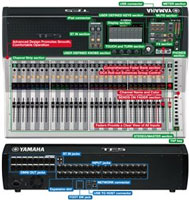 Careful analysis of workflows preferred by many top engineers led to a perfectly optimized control layout that enables highly efficient operation. Yamaha didn't just pack the TF series with a random list of modern features; you'll find only functions that truly make sense. They are logically arranged and always within reach thanks to a design optimized for visibility and usability right down to the smallest detail.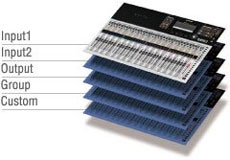
Comprehensive Fader Bank Section
There are two "INPUT" banks and one "OUTPUT" bank. Pressing both "INPUT" bank buttons at once activates a "GROUP" bank. Here, levels of multiple channel faders that belong to a group can be controlled by a single DCA fader. There's also a "CUSTOM" fader bank (user-assignable) where you can assign any input, output or DCA group to any fader.
DCA "Roll-Out" Function Simplifies Access to Individual Group Channels
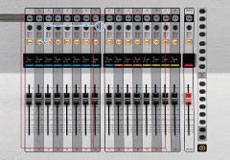 When the "GROUP" fader bank is selected, all faders except the DCA masters 1–8 act as so-called "roll-out" faders. That means when a DCA group is selected, the input channels belonging to that group are rolled out to their own fader set. This gives quick access to levels and other parameters of individual group channels while the eight DCA faders are used for the overall mix.
 Channel Names and Color
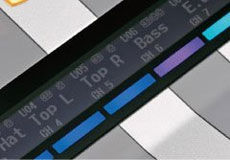
A display above each channel fader shows the assigned channel name or ID, the connection name and the current fader position. Phantom power status and compressor/gate activity can also be displayed. A color bar indicating the channel color makes navigation child's play and prevents mistakes when scenes are recalled or fader banks are switched.
Faders Provide an Informative View and Direct Access to All Inputs
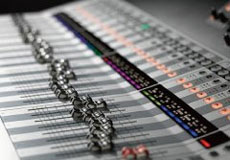 The TF5 has 33 motorized faders, the TF3 25 and the TF1 17. Every input on the rear panel has its own fader, so settings are visible at a glance and can always be accessed directly and instantly.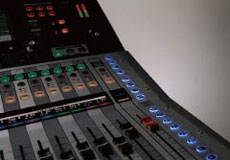
SENDS ON FADER section
The "SENDS ON FADER" buttons assign the faders to AUX or FX bus levels so these can be read and adjusted comfortably. When "SENDS ON FADER" is active, the master fader acts as the bus master for the selected bus. AUX levels can be checked and adjusted without changing the fader bank.
Upper Console Area and Ergonomics
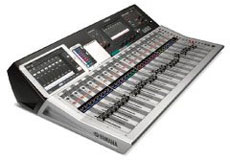 The upper area of the console surface is designed to hold an iPad, a setlist, notes or other small items. The control surface is made up of three cleverly angled sections to provide maximum overview and perfect access to all controls.
More Features for an Efficient Workflow
Regularly used parameters like compressor threshold or EQ gain can be assigned to these knobs so they are always at hand.
Assign frequently used mixer settings to one of the keys for quick recall of individual scenes.
Multiple inputs or effects can be muted or unmuted at once from here.
A dedicated channel provides functions like "Effect ON/OFF", "CUE-Monitor ON/OFF", level adjustment and effect parameter control.
You can play back digitally from an iPad or iPhone, record to and play from a USB storage device, and access backing tracks and other audio files at your fingertips.
Apps That Integrate Seamlessly Into the TF System
Standalone software that supports wireless mixing, personal monitor mixes or offline setup of digital live consoles is widespread. The TF series delivers three specially adapted apps: "TF Editor", "TF StageMix" and "MonitorMix", which expand the console's control surface across platforms.
"TF Editor" Enables Offline Editing and Real-Time Control
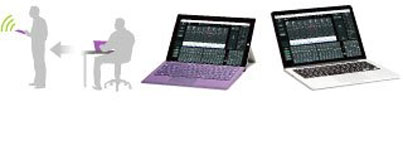 The "TF Editor" software for Windows and Mac provides a complete interface for offline setup and editing. You can manage presets and scenes and conveniently enter channel names via an on-screen keyboard. Offline editing isn't the only option: "TF Editor" can be used online simultaneously with "TF StageMix" and "MonitorMix". The gestures that work on the console display also work with the touchscreen of a Windows 8 PC. Over Wi-Fi a PC can act as a comfortable remote control for the mixer. Up to three devices running "TF Editor" or "TF StageMix" can be used at the same time.
"TF StageMix" for Mixing Over Wi-Fi
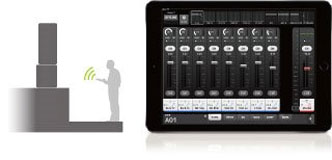 "TF StageMix" is an iPad app that turns the tablet into a wireless controller for the TF series. You can mix remotely from the audience area, in front of stage monitors or any other listening position. The app can also extend the console's UI and matches the console's smooth operation so you can fine-tune the mix from anywhere.
Personal Monitor Mixing With MonitorMix
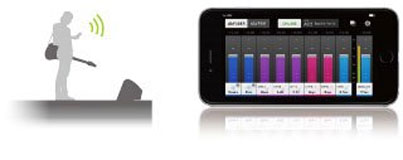 The MonitorMix software for the TF series allows independent AUX monitor mixes from up to ten Apple devices (iPad, iPhone, iPod Touch) simultaneously. Each performer has comprehensive control over their assigned aux buses without dealing with complex parameters. Grouping options simplify operation further—for example, all levels in a monitor mix can be controlled by a single fader. Up to three devices with "TF Editor" or StageMix plus up to 10 devices with MonitorMix can be connected simultaneously. This enables large bands to hand control of monitor mixes to artists themselves and eases the workload on the mix engineer.
A Natural Sonic Foundation and Additional Creative Freedom
Faithful reproduction of the stage sound provides the foundation, and creativity follows. Yamaha's uncompromising approach to live sound is fully reflected in the TF series. For example, the input stage of each console noticeably affects tonal character. TF consoles feature D-PRE microphone preamps that not only deliver excellent sound quality but also allow settings to be saved and recalled. Circuits and modules were refined where possible to achieve an exceptionally clean, natural sound. This clean foundation can then be processed with a range of top processors and effects. The EQs, compressors and gates on inputs and outputs are complemented by eight additional sound processors that provide plenty of room for creative sound design.

Recallable D-PRE Microphone Preamps
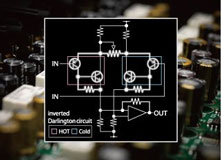 The TF series is equipped with new versions of Yamaha's acclaimed D-PRE microphone preamps. Because preamps significantly influence final sound, Yamaha's engineers spared no effort refining the preamps to ensure no nuance of the original signal is lost. The preamp is based on a discrete inverted Darlington pair design that provides clear, precise gain with consistently low noise and distortion across all levels. While some mic preamps deliberately color the sound, the D-PRE preamps were painstakingly tuned toward a very neutral character with a wide frequency range so the artist's uniqueness and every detail of their performance remain fully intact.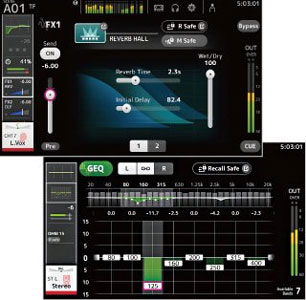
Powerful Processors and Effects
In addition to an EQ and two dynamics processors on each channel, the TF series includes eight further powerful processors and effects for comprehensive signal processing. The two always-available FX modules correspond technically to Yamaha's famous SPX processors, long standard tools in live and studio work. The 17 programs range from halls and delays to modulation effects like flanger and chorus, and include 3-band multiband compression. Press EDIT to open the effect parameter display where you can adjust parameters such as "Reverb Time" or "Delay Feedback". The remaining six processors are available on mix buses AUX 9/10 through 19/20 and include all effects except reverb.* Multiband compression is ideal for level control in in-ear monitoring, while delay can be used for speaker delay alignment. Since AUX buses can be summed to stereo, effects can also be applied to input-channel processing if FX 1 and 2 are not sufficient. AUX buses 1–8 and the main output channels feature the same parametric 4-band EQ as the inputs and additionally a 31-band Flex12 graphic EQ. Both EQ types are essential for speaker tuning and feedback suppression. * Reverb is available on AUX 9/10 and AUX 11/12.
Versatile Live Recording and Playback for Any Application
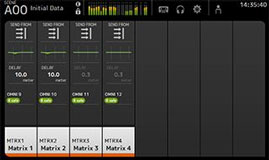 The ability to record live is increasingly important for live systems. The TF series supports simple 2-track recording/playback to a USB storage device* as well as multitrack recording via a computer-based DAW. The console is delivered with Steinberg's Cubase AI, allowing up to 16 tracks to be recorded to a computer connected via USB 2.0. For more complex setups the optional DAW Nuendo Live (also Steinberg) allows simultaneous recording of up to 34 tracks. USB storage devices can play back MP3 and WAV files. iPhones and iPads can be connected digitally for audio playback. When playing from a DAW, either the analog or DAW input can be selected per channel so pre-recorded material can be mixed with live inputs for virtual soundchecks or rehearsals. Of course backing tracks and sound effects can also be played back.
The TF1 delivers impressive power and versatility for smaller setups; it's compact, portable and can be rack-mounted!

Features
- 17 Motorized Faders (16 Channels + 1 Master)
- 40 Input Channels (32 Mono + 2 Stereo + 2 Returns)
- 20 AUX Buses (8 Mono + 6 Stereo) + Stereo + Subgroups
- 8 DCA Groups with Roll-Out Function
- 16 Analog XLR/Jack Combo Inputs for Mic or Line + 2 Analog Stereo Line Inputs as RCA Connectors
- 16 Analog XLR Outputs
- 34 x 34 Digital Recording and Playback Channels via USB 2.0 + 2 x 2 via USB storage
- 8 Effects and 10 Graphic Equalizers
- 1 Expansion Slot for an NY63-D Audio Interface Card
- Touch Control
- "Touch & Turn" Knobs
- Proven "Overview" and "Selected Channel" Views
- "1-Knob COMP" & "1-Knob EQ"
- GainFinder Function
- QuickPro Presets
- TF StageMix for Mixing Over Wi‑Fi
- Personal Monitor Mixing With MonitorMix
- Recallable D-PRE Microphone Preamps
- Internal Automixer Card by Dan Dugan
- Including Steinberg's Nuendo Live Recording Software
- Sampling Frequency: 48 kHz
- Latency: <2.6 ms, INPUT to OMNI OUT, Fs=48 kHz
- THD: <0.05% 20 Hz–20 kHz @+4 dBu into 600 Ω, INPUT to OMNI OUT, Input Gain=Min.
- Dynamic Range: 110 dB typ., DA Converter, 107 dB typ., INPUT to OMNI OUT, Input Gain=Min.
- Dimensions (W x D x H): 510 x 599 x 225 mm
- Weight: 13.5 kg
Scope of delivery
- 1 x Yamaha TF-1 Digital Mixer
Specification
- Product number 00121031
- Colour Silver
- Labelable channel strip Yes
- Number of microphone inputs 16
- Outputs RJ45 Netzwerkbuchse, USB, XLR
- WiFi Yes
- Inputs 6.3mm Klinke, Cinch / RCA, RJ45 Netzwerkbuchse, USB, XLR
- Expansion Slot Yes
Write the first review
Share your experience and help others with their purchase decision. Review the product directly from the order history in your customer account.
Review nowQuestions about product
No questions have yet been asked about this article.
Financing with ConsorsFinanz
You can finance your order in convenient monthly installments from a value of €100.00.
- 6 to 72 months term
- 0% financing with 6- or 12-month terms
- Financing from 42,06 € / month
easyCredit instalment purchase
You can pay the purchase amount conveniently in installments. You will see immediately whether your application has been approved.
- 2 to 60 months term
- Financing from 58,00 € / month